Introduction
With "Prinect Color Proof Pro", you can connect various printers, especially for printing color and layout proofs, to the Prinect workflow (Prinect Integration Manager, Prinect Prepress Manager). Color Proof Pro supports you in creating individual paper profiles and in linearizing printers. The close loop calibration feature is supported for suitably equipped printers.
Without Color Management, color reproduction depends on the properties of the respective output device. When you print the same file on two different printers, you will see different colors in most cases. Even two printers of the same model can print with a slight difference.
To overcome this problem, the ICC (International Color Consortium) developed a recognized standard for Color Management Systems. It makes uniform, device-spanning color reproduction possible. This standard is based on several profiles controlling the color reproduction from image creation up to image output.
The goal of Color Management is to standardize the color reproduction of digital image data over the entire editing process. Color space conversion was introduced to achieve a standardized color representation. Color space conversion basically matches the image or graphic data from the creator color space (e.g. color space of a digital camera) to the color space of the output device or process (e.g. color space of a color printer).
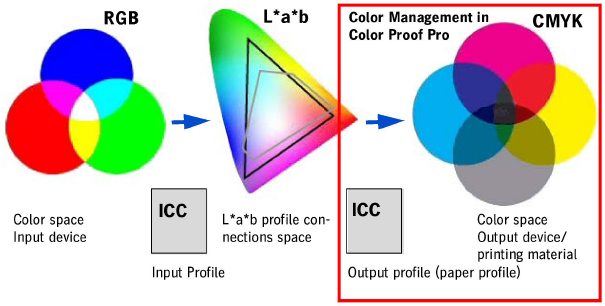
The diagram below shows the basic principle of a color space conversion:
•First of all, the data are in the color space of the input device (scanner, digital camera, etc.) (device-dependent color space).
•The data are converted to the device-independent profile connections space (CIEL*a*b* color space) when the input ICC profile is enabled.
•For output with Color Proof Pro, an output ICC profile matching the output process is activated that matches the image data to the printer's color space (in connection with the used paper). As a result of this, the image data are again device-specific.