Working with 'Process standard'
You can do the following actions with "Process standard":
•Select a process standard that you wish to use to display the color data
•View or modify the settings for the standard used in "Measure > Process standard"
•Modify or delete a standard
•Import or export a standard
•Calculate/generate a wet process standard
•Create a new four-color (CMYK), multicolor or spot color standard
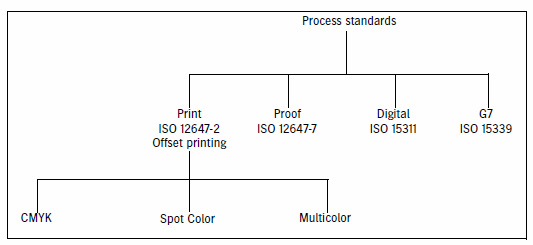
You can view and edit standards for the following print processes:
•CMYK: conventional four-color printing
•Multicolor: a maximum of seven process colors (CMYK primary colors and up to three additional secondary colors red/orange, green and/or blue)
•Spot colors: a maximum of eight spot colors or four process colors (CMYK) and a maximum of four spot colors
The nominal values and tolerances of a process standard that you can view and edit depend on the printing material you selected for paper white and the primary colors (cyan, magenta, yellow and black). You can also select the secondary colors (red, green and blue) and CMY gray (overprint) if you wish.
This main function is divided into two sections that you can open with the appropriate tab icons or menu commands:
•Select "Overview" to view information about a selected process standard (see 'Overview').
Click "Edit" to go to the edit mode for the selected process standard. You can then either modify a custom standard or use a shipped standard as a basis and save it under a new name.
•You can view all the process standards saved in the local or global master database (MDS) in a tree structure in "Administration" (see 'Administration' View).
Tooltips provide you with more details about the process standard (printing materials, comments and any write protection).