
在 Prinect CP2000 Center 上配置符合的数据储存器
1.首先,您必须在印刷机(Prinect CP2000 Center)上,符合软件版本的执行以下几点操作:
V37.6 以上,打开软件模块"DataControl"。

自 V41.6 版本起,打开数据存储器"DataControl"。


自 V44.0 版本起,打开数据存储器"Workplace Interface"。


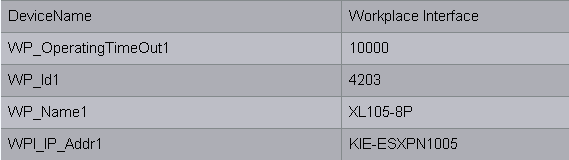
在所有情况下出现以下窗口。

|
CDM 装置 |
Prinect CP2000 Center |
|---|---|
|
工作位置编号 |
"WP_Id1" |
|
装置名称 |
"WP_Name1" |
|
Prinect 服务器名称 |
"WPI_IP_Addr1" |
属性分配表格总览:
2.在"WP_Id1”属性中输入您之前在"Prinect Integration Manager/Prinect Pressroom Manager"上输入的数值。在本例中为"4203"。
通过"WP_Id1”稍后可明确识别出"Prinect Integration Manager/Prinect Pressroom Manager"中的印刷机。
3.在"WP_Name1”中输入所需的装置名称。在本例中为"XL105-8P"。
您之前已在"Prinect Integration Manager/Prinect Pressroom Manager"的"装置名称"中设定了此装置标识。
4.在"WPI_IP_Addr1”属性中输入 Prinect 服务器名称。在本例中是"KIE-ESXPN1005”。现在应建立与"Prinect Integration Manager/Prinect Pressroom Manager"的连接。
在添加印刷机后,您必须在 BDE 配置和 Prinect CP2000 Center 之间进行同步(见BDE 配置和印刷机的同步)。
在 Prinect CP2000 Center 上配置颜色测试数据(只有连接 Prinect Axis Control I 时)
颜色测量数据目录的配置将在在 Prinect Press Center 上配置颜色测量数据输出中加以说明。