Server-client architecture
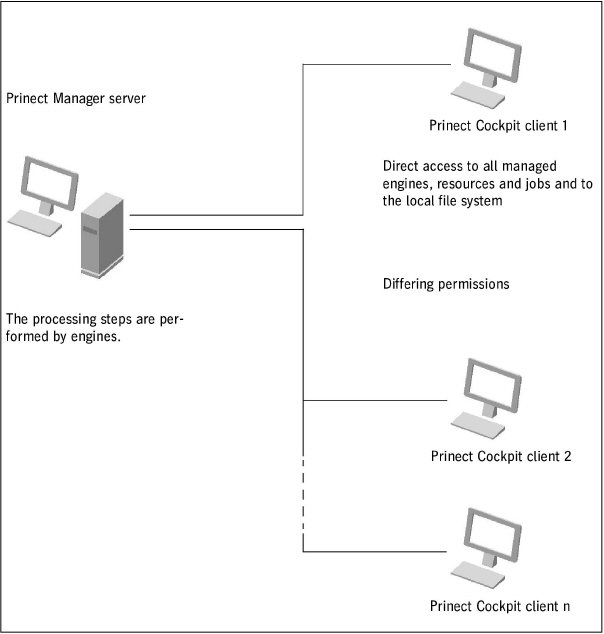
The modular structure of the Prinect Manager allows the engines and the user interface to run on different computers. These engine computers must be accessible in the network neighborhood of the Prinect server and the engines must be joined to the Prinect server.
The Prinect Cockpit works as a "client" in the system environment. By default, the Prinect Cockpit is installed with the basic installation on the Prinect server. You can also install the Prinect Cockpit on one or more other computers (Windows PC or Macintosh). You can also install and use the Prinect Cockpit on several computers at the same time. The assignment of user permissions controls the settings each user can make. The number of users who can operate the Prinect Cockpit at any one time depends on the number of Prinect Cockpit licenses acquired.
The Prinect Manager is a modular system that combines different document-processing tools, known as "engine modules", in a common user interface, the Prinect Cockpit. Every engine performs one processing step in job processing.
You control your workflow through the Prinect Cockpit user interface. You can process jobs, view the status of your jobs and submit job elements manually onward to the next step. In addition, you configure the system from the Prinect Cockpit. In this way, you can predefine operating sequences, for example, and save them as templates. You can select and use these set templates ("sequence templates") in an automated editing process based on criteria you define. The Prinect Cockpits are enabled through floating licenses, letting you install in principle more Cockpit clients that you actually use. Only the Cockpit licenses requested by running Cockpit clients are used; Cockpit clients that are shut down do not need a license. Put differently, you need just as many Cockpit licenses as Cockpit clients running at the same time.
The individual steps in job processing are performed in the Prinect Manager by so-called "engines". Generally, the engines do not have their own user interface, but some stand-alone applications like Prinect Shooter, for example, can also work as a Prinect engine. Operation is solely in the Cockpit or to some extent also in the Prinect Portal. While the Prinect Cockpit can run on an external computer, the engines run on the respective server on which they are installed. The engines are implemented as "Windows services" and run in the background.
"Windows services" are applications that can be started and terminated under Windows without needing their own user interface. You can control the services in Windows Computer Management.

Note: For more details on licensing please see the "Heidelberg Prinect Licensing - User's Guide". Only a few basic statements on licensing will be made here.
The "License Server" refers to a computer on which the "License Server Software" is installed. This does not have to be the same computer as the one on which the Prinect server software is installed. In large system environments with a great number of Prinect products, it may be advisable to install a dedicated License Server.
The license server has the task of managing all product licenses on a central server (PC). The licensed products no longer have a dedicated product dongle each, but rather receive their licenses from the License Server that is enabled online via the Heidelberg licensing management or locally by a dongle (USB stick).
The License Manager is the user interface for the License Server. In the License Manager, you manage your licenses, enable single licensing options, store existing licensing data, etc. Each License Server installation automatically includes installation of the License Manager. The License Manager is also installed along with each Prinect application. Like the Cockpit, the License Server is a client application, making it possible for you to operate it from each License Manager. For example, you can enter the license key for a newly installed Prinect application directly on the computer on which the application was installed.

Note: In some cases, a new installation of a License Server does not detect new installations of Prinect applications and, as a result, the message "Product unknown" is issued when you enter the license key in the License Manager. Only when you send an application for the first time to the License Server does the License Server recognize this application. The application is then enabled by entering the license key. Because a License Manager is also installed together with each Prinect installation, we recommend that you enter the license key on the computer on which the application was installed.
Online licensing is based on an online protection certificate that is enabled during installation of the software. For this purpose, before installation of the Prinect software, an installation code is required that triggers activation. The certificate is connected to real or virtual hardware and is automatically renewed daily. If the Internet connection to the Heidelberg Trust Center should fail temporarily, the existing certificate continues to be valid for 30 days. Administration of online licensing is through the Prinect Maintenance Center and the Prinect License Manager.
As of version 2019 licensing via a dongle is no longer supported. The switchover to online licensing is also applicable for any version upgrades.
Data structure and file formats
Data structure as the folder structure in the file system
The system folder for job-specific data: PTJobs
You can specify the structure of the job data in the Prinect Cockpit, for example by creating different folders for different customers. You can see this folder structure in the Prinect Cockpit. Appropriate folders are created at the same time in the file system of the Prinect Manager server, as subfolders of the "PTJobs" folder. The drive on which the "PTJobs" folder is located is specified when installing the Prinect Manager server software. The "PTJobs" folder is automatically shared for network access during installation.
The system folder for system-specific data: PTConfig
The Prinect Manager is a widely networked system that lets you connect different computers with varying tasks (several Cockpits, distributed engines). A central "PTConfig" folder is made available on the Prinect server for the components in the network (engine server, License Server, Data Terminal, etc.). The connected computers can swap information and system-specific data in this folder. The "PTConfig" folder is also shared in the network.
The system-specific data is organized as a tree structure which is represented in the "PTConfig" folder by a folder structure in the file system.