
The widget shows the machine status of a single machine. The information that displays includes production progress of the current job and other administrative data.
The open widget shows the current data of the job on the machine in the "Status" tab. The scheduled operations display in the "Operations" tab. Each of these operations can be opened in the "Job status". Checkpoints can be set for the current production job.
Note: The Details view (click in widget) is not supported on the Wallscreen XL.
A Prinect Pressroom Manager with the "Analyze Point" option.

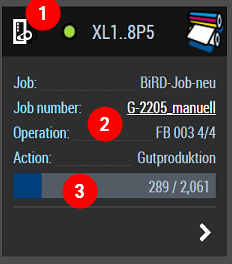
•(1)
Status of the machine
The color of the dot indicates the machine status. In addition, a tooltip
displays the exact status (Running, Makeready, Idle, Down, etc.).
•(2)
Details about the job currently running
The job name, job number, operation (name) and action of the running job
display. The operation is relevant especially for production data collection
(PDC). It appears later on the daily time sheet of the machine operator.
•(3)
Printing progress
The bar shows the number of printed good sheets in relation to the planned
good sheets. The diagram is refreshed only after you press "F5"
or click the refresh icon at the top right in the dashboard.
Create dashboard for machine status

Video Tutorial:
"Create
dashboard for machine status"
Duration: approx. 4:20 min
Plan order of operations for machine

Video Tutorial:
"Plan
order of operations for machine"
Duration: approx. 3:30 min