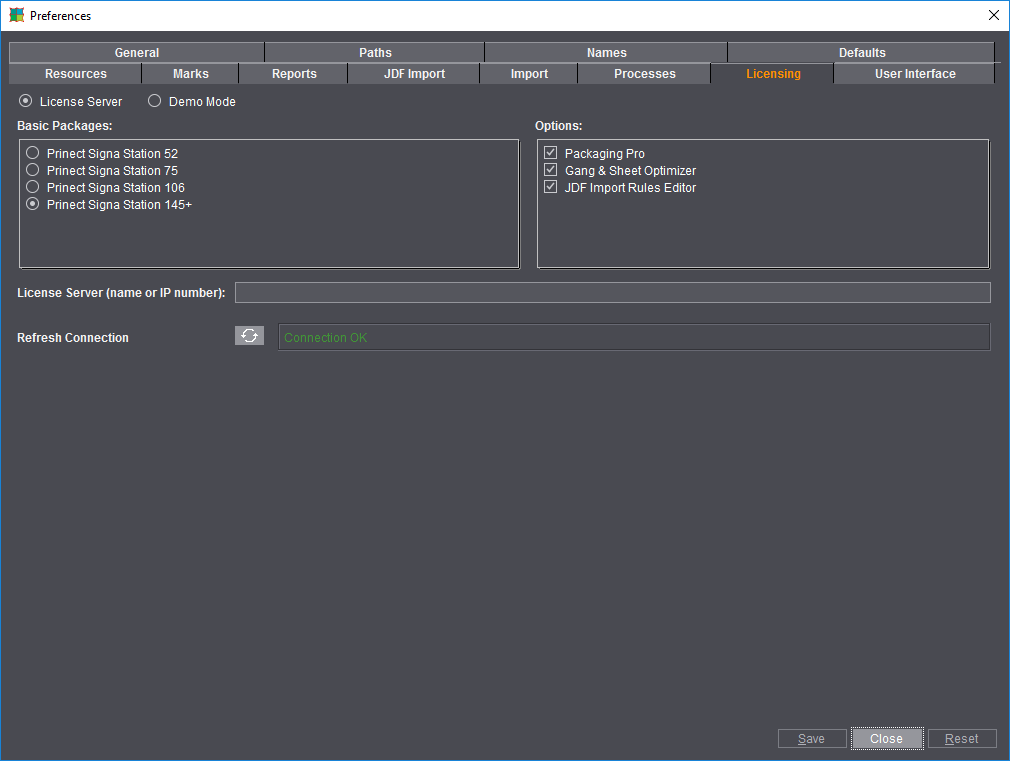
The window below displays when you first start Prinect Signa Station.
To add to or change your licenses and options at a later period, you can make your changes in the "Option Chooser" tab. The changes are enabled when the system restarts.
This option is set by default and lets you install a full version of Prinect Signa Station. You must have a valid license for this.
The entire software functionality is available to you in the demo mode. You can put the software through all its paces and only then decide if you want to acquire a license.
It is not possible to output a job. When you save demo jobs, they will be marked so that you cannot output any of the jobs you created.

Warning: You can open jobs from the full version of Prinect Signa Station and change them but you cannot output them again once they are saved in the demo mode. You should not open your production jobs with the demo version.
License Server (name or IP number)
A Heidelberg license server must be installed on your computer or in the network to be able to run Prinect Signa Station. Type the name or IP address of this license server into the box.
Shows connection status to the License Server. You can refresh the display if necessary.
Select the basic package you have a license for. The following packages are available:
•"Prinect Signa Station 52": The printing plate width is restricted to 67.5 cm. All output formats are available to you (PDF, JDF, PostScript, Adobe Portable Job Ticket Format (JT)). Default data for the workflow.
•"Prinect Signa Station 75": The printing plate width is restricted to 83.5 cm. All output formats are available to you (PDF, JDF, PostScript, Adobe Portable Job Ticket Format (JT)). Default data for the workflow.
•"Prinect Signa Station 106": The printing plate width is restricted to 116.5 cm. All output formats are available to you (PDF, JDF, PostScript, Adobe Portable Job Ticket Format (JT)). Default data for the workflow.
•"Prinect Signa Station 145+": The printing plate width is restricted to 600 cm. All output formats are available to you (PDF, JDF, PostScript, Adobe Portable Job Ticket Format (JT)). Default data for the workflow.
•"Prinect Signa Station Server": The printing plate width is restricted to 600 cm. Only the JDF and JT (Adobe Portable Job Ticket Format) output formats are available to you.
You may use this variant only in a workflow with the Prepress Manager.
A layout can be put together automatically by all the Prepress Manager Cockpits without having to operate Prinect Signa Station interactively.
Select the option matching your license. Multiple selection is possible. The following options are given:
•"Packaging Pro": Has all the editing and animation functions needed for the "Packaging" workflow (see the Packaging (Packaging Pro)).
•"Gang & Sheet Optimizer": This option makes it possible for you to create a gang job ("Ganging Optimization" work mode) using multiple sheet optimization (see Requirements for Creating a Gang Job for details).
"JDF Import Rules Editor" is a rules editor for creating special rules that are applied when you import JDF files (see the JDF Import Rules Editor... ).