
Sheet related finishing and ganging
Workflow of the Prinect Gang-Pool
A job calculation has print sheets. For each sheet a flag can be set to indicate that the sheet can be printed on a gang sheet. Possible values are: "always", "candidate" or "never".
The default value for this flag can be configured in the product type part. In the estimation, the user can change the value of this flag for each sheet, in fact for each print form.
Each job is send to Prinect via a JDF message. In Cockpit a "prepare" sequence can be used to send the sheets to the gang pool. Prinect SignaStation or Prinect SignaServer read the gang candidates and create the gang job out of them, using the folding schemes of these selected print sheets.
These gang-jobs are imported by the Prinect Business Manager as new production jobs.
In this process, the initial jobs are updated, so that the print sheet in this job knows in which gang job the print sheet is produced. The printing in the initial job is disabled. This will avoid double paper ordering and/or scheduling, etc….
Technically spoken, the print sheets with the ganging flag on "always" are already indicated in the JDF with the attribute "Activation" = "Informative" when they are send to Prinect. This means, it is disabled in the initial estimation and delegated to the gang-job.
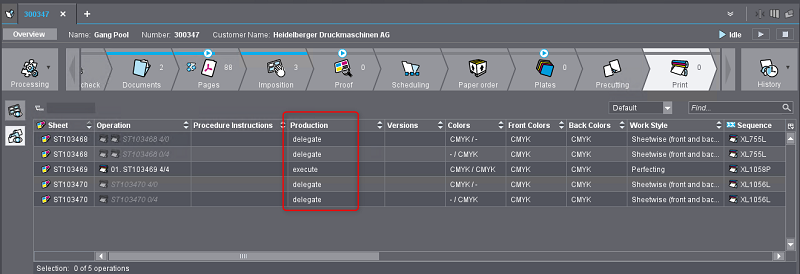
An inner signature sheet usually needs to be folded. In some caces, before this process can take place, the print sheets needs to be cut to separate poses.
Another possibility is, that the folding can be done in 2 poses at the same time. Then the separation happens on the folding machine. All the sheet related finishings are also listed in the JDF. They are put in a one single "gray box".
If a print sheet is set to be ganged, then it will be put on a gang sheet together with other folding schemes. After printing, there is always cutting, to be able to continue in the process flow.
The cost for cutting is put on the gang job, not on the inital job. This means that the inital job also has to delegate the cutting to the gang job and put this as a process in the JDF with the attribute HDM:Delegated="true".
In case of an inner signature, folding needs to be done on the initial job. Also other types of finishing after cutting always belong to the inital customer job. In these cases the attribute should not be there or at least put to "false".
It is possible that a customer job has a print sheet with sheet related finishings that happen before cutting. For instance, folding or laminating in 2 poses. Cutting happens after these processes. Delegating such print sheet to the gang pool will lead to inconsistencies.
•The gang sheet can have a different imposition, so that folding with 2 ups is not possible. Or folding per three would be better.
•The cutting in the customer job cannot be delegated, because folding cannot be delegated.
Consequently, there are cases where a print sheet cannot be send to the gang pool because of the sequence of the finishings. The value "always" of the gang pool flag should then be prevented.
As soon as the gang job is sent back from Prinect SignaStation to Prinect BusinessManager, the gang job is also transferred to the Prinect Cockpit. A new job is created there. In this gang job the inital jobs are visible and the jobs are also reachable with a provided link.
Situation
•The flag for the gang pool needs to be extended with the value "blocked" in case sending to the gang pool is wanted and prevented by the sequence of the finishings.
•In order to assist the creating of the JDF, each sheet related finishing should also have a flag if it will be transfered to the gang job or not. In most cases only the first cutting will be delegated.
•The JDF should be extended so that not all sheet finishings have the same attribute 'IsInformative'. The JDF could keep one gray box, but the attribute HDM:Delegated="true will be possible on the level of the workstep and not on the level of the complete gray box.
Remarks
Use case 1: the print sheet in the customer job is done printed in multiple poses, without cutting but separating the poses during the folding. Then there is also an inconsistency; because the layout of the gang sheet could be different and complex cutting in the gang job will not be supported.
Use case 2: if printing is done in a single pose, then there is no cutting. Sending the sheet to the gang pool is possible.
What happens if there are inline finishings?
After the user changes the sequence of the finishings of a print sheet that is blocked for the gang pool, it should be possible again. The value should be put back from "blocked" to "always".
The settings for the flag can be made in the product parts.
PBM explorer > Production > Product types > Product groups > Properties > Parts > Technical
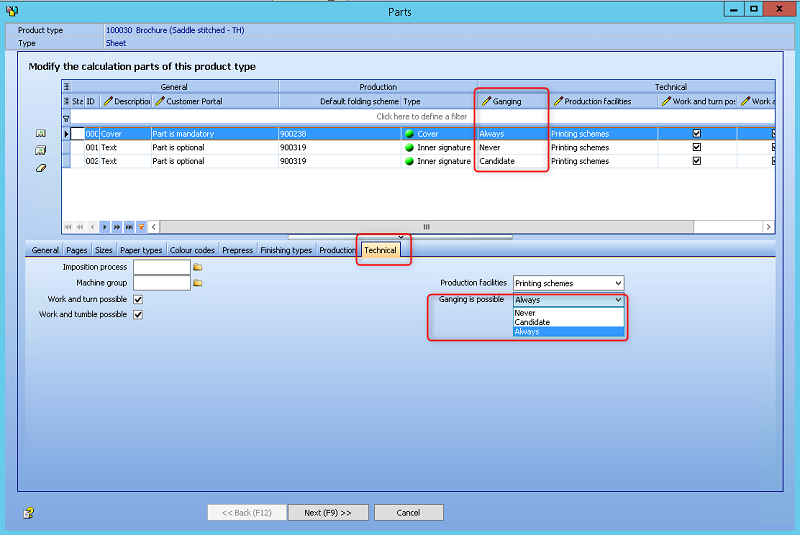
Viewing the ganging flag in the estimation
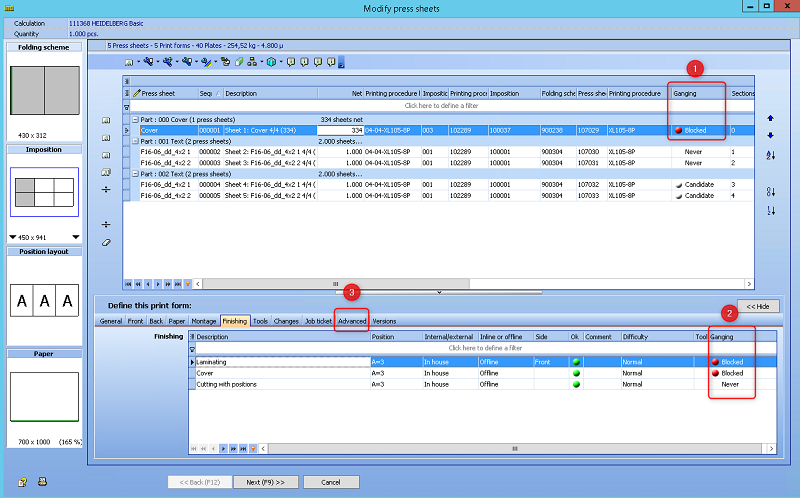
(1) The existing column in the grid has been extended with an extra value "Blocked".
(2) The overview of the sheet related finishings has a new column "Ganging" with the same values as those for the print sheet. This is an indication for each process if it will be delegated to the gang-job (green bullet) or done in the customer job (no bullet). In case folding is done before cutting, then it will block the print sheet for the gang pool. Then a red bullet will appear.
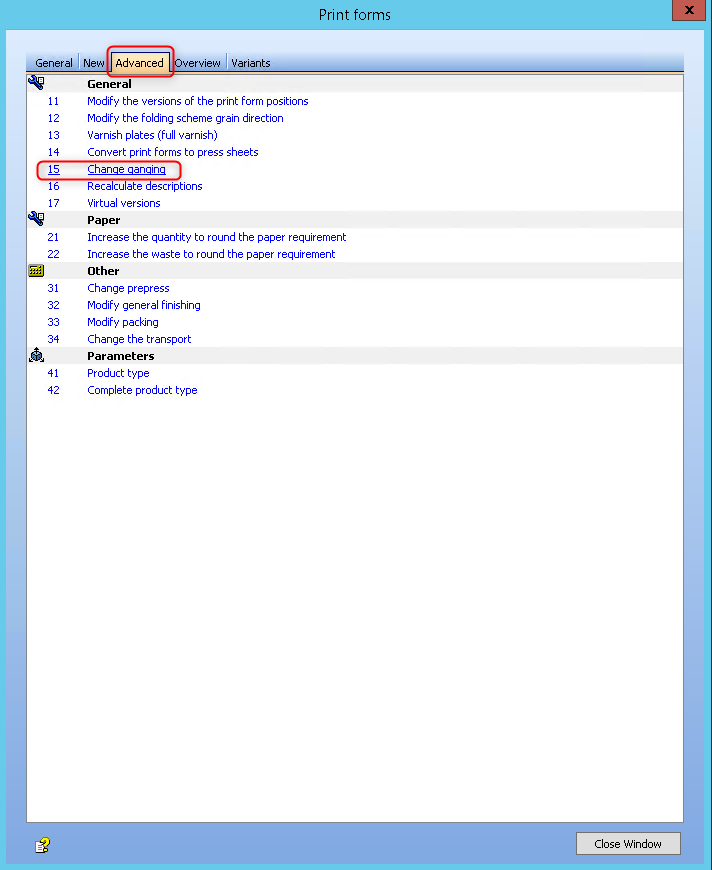
(3) The tab "Advanced" has a combobox to change the value for gang pool.
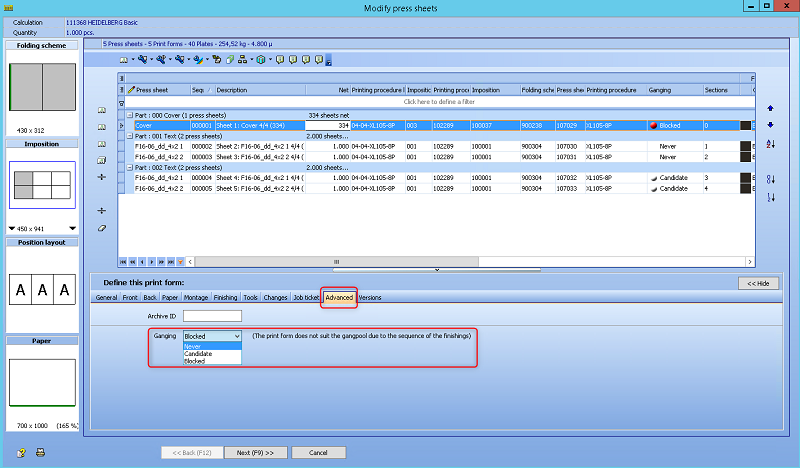
In case the sequence of the finishings leads to problems, a remark will appear.
The possible values are now: "never", "candidate" and "blocked".
•If print forms have a value "blocked"' for the gang pool, then a warning pops up when moving to the next screen.
•The user can ignore this warning and continue to finish the wizard.
•The user can fix the problem manually or use the special button to "Solve the problem".
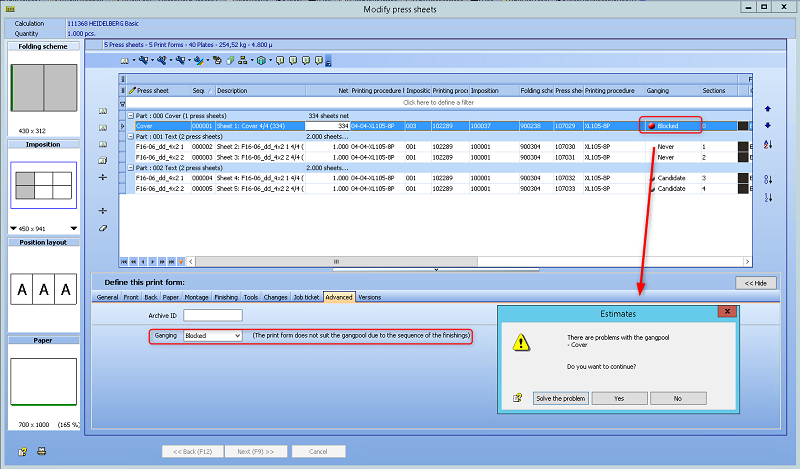
Pressing "Solve the problem", the window "Modify press sheets -> Modify finishing types" will open.
Simply change the sequence of the cutting and folding will solve the problem.
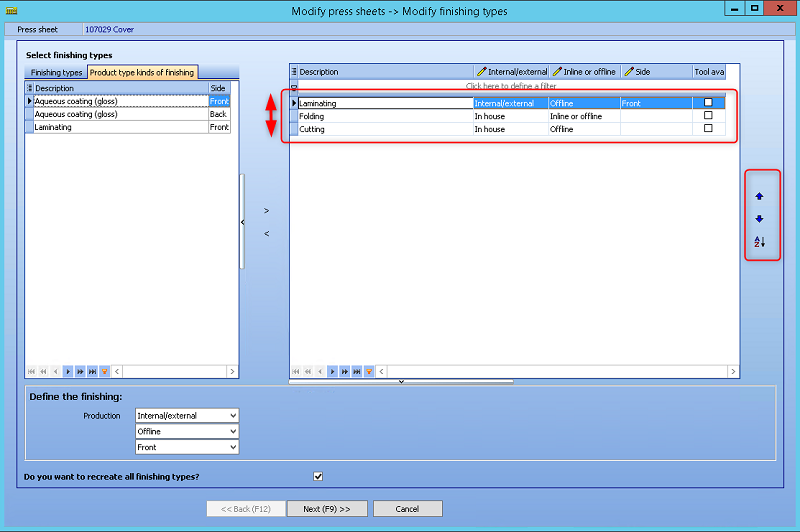
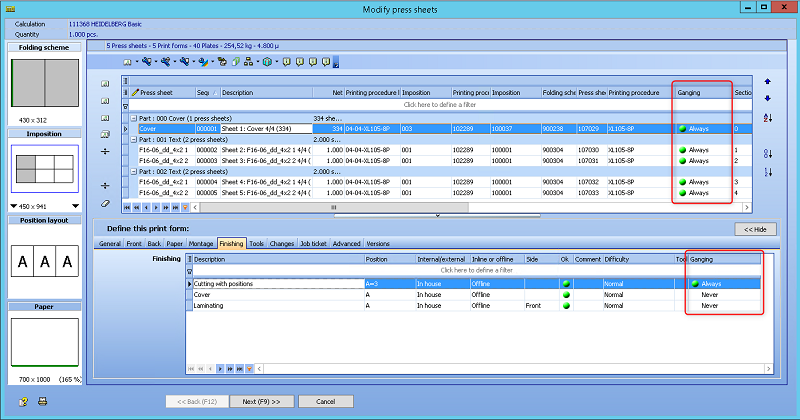
This wizard can also be started manually.
Another option is to go to the finishings using "F6 - 62 - Modify finishing in selected print forms" or doubleclick on the grid of the finishings overview for the print forms.
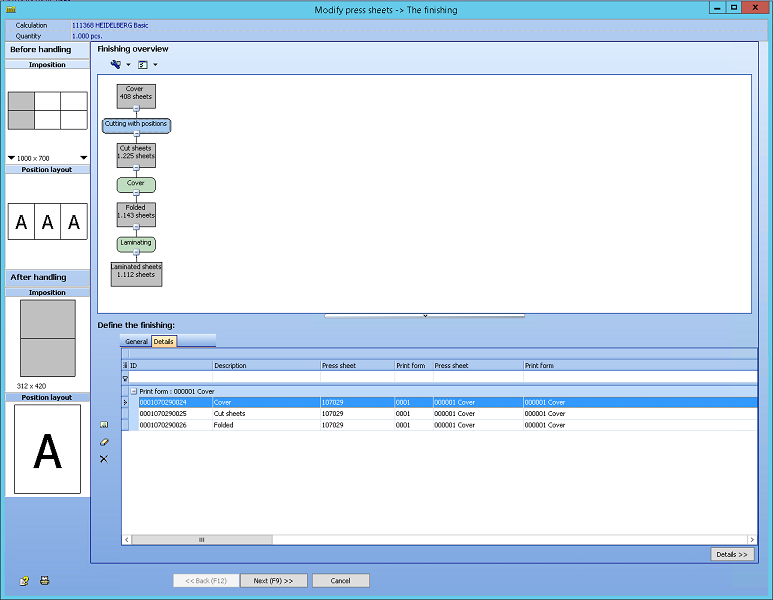
Select the first block and add a new cutting process using "F11". This subwizard will ask to delete to other cutting.
The value for the gang pool will set back to "Always" automatically.
Last option to solve the problem is to change the value for gang pool to "Never". This means that this print sheet will not be delegated to the gang pool and will be produced in the original customer job.
Changing the flag in group
Select one ore mmore print forms. Press "F6" and swith to the tab "Advanced". Choose "15 - Change ganging".
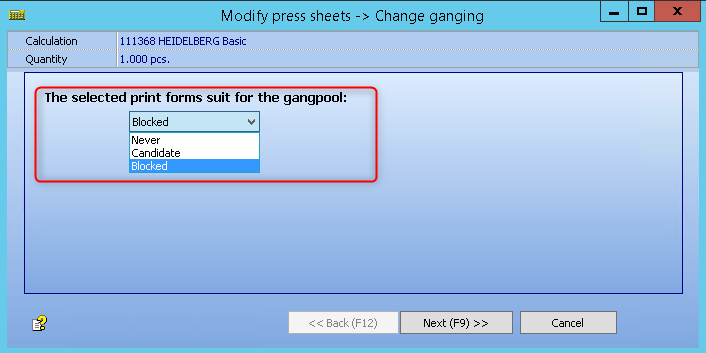
If multiple print forms are selected that are suited for the gang pool together with print forms that are not suited, then a remark will appear.