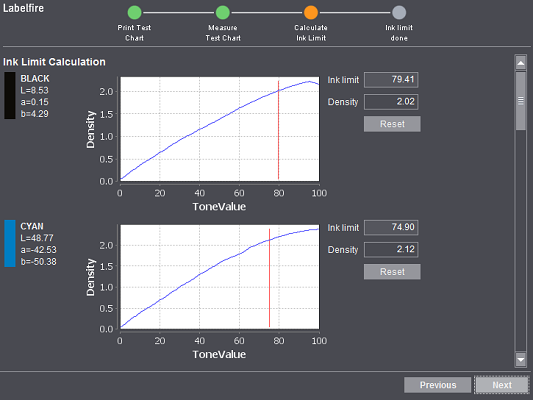
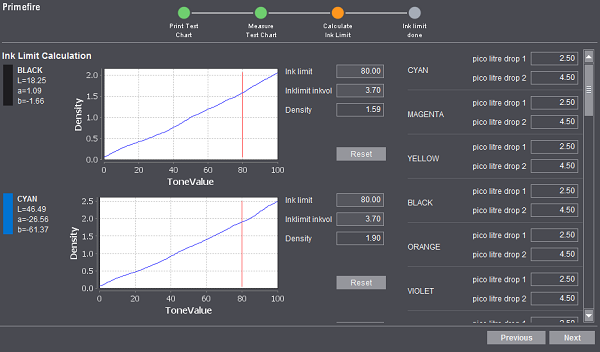
Labelfire Primefire
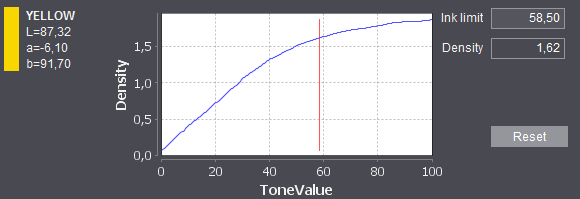
This is where the result of measurement displays. The density of each color compared to the tonal value is shown in a diagram. In the example below, an area coverage of 20 % for yellow produces a color density of 0.72, 1.63 with 60 % and 1.86 with 100 %. Prinect Color Center calculates the optimal ink limit for each color from these curves. It is indicated by a vertical red line. In this case, the optimal ink limit is at 58.5 %, with a color density of 1.62. Normally, you do not have to define any other settings here.
You can also edit the value manually, if required. Enter the value you want for ink limit in "Ink Limit". However, if you decide afterwards that you want to use the calculated value, you can restore it with "Reset".
If you are running the Labelfire with low migration ink (and have set it correctly in Administration, see Ink generation ), then you can also view the drop size in picoliters on the right.
On the Primefire, you can set the ink limit not only by entering values in percent but also by specifying the ink volume. As an additional source of information, you can view the volume of both fixed drop sizes in picoliters for each of the inks on the right.

Note: You cannot select ink limits greater than 3.1 pl for the Primefire. The metrological calculation is also limited to 3.1 pl.
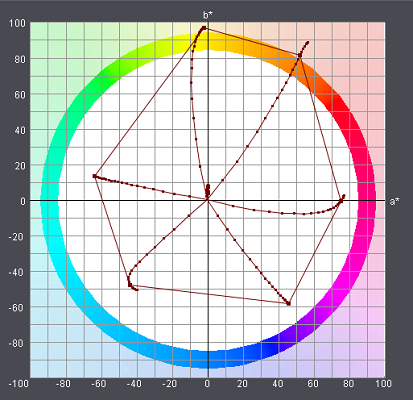
The measurement results display projected on the a*b* coordinates plane if you scroll down further in the window. The straight connecting lines represent the ink limit.
With some colors, as of a certain point increasing the amount of ink results in a change of hue; this can be seen by a bent line. In this case, it makes sense to limit the amount of ink beforehand.
When you are happy with the set ink limit, click "Next".

Note: The new values for the ink limit are saved only after you click "Next".