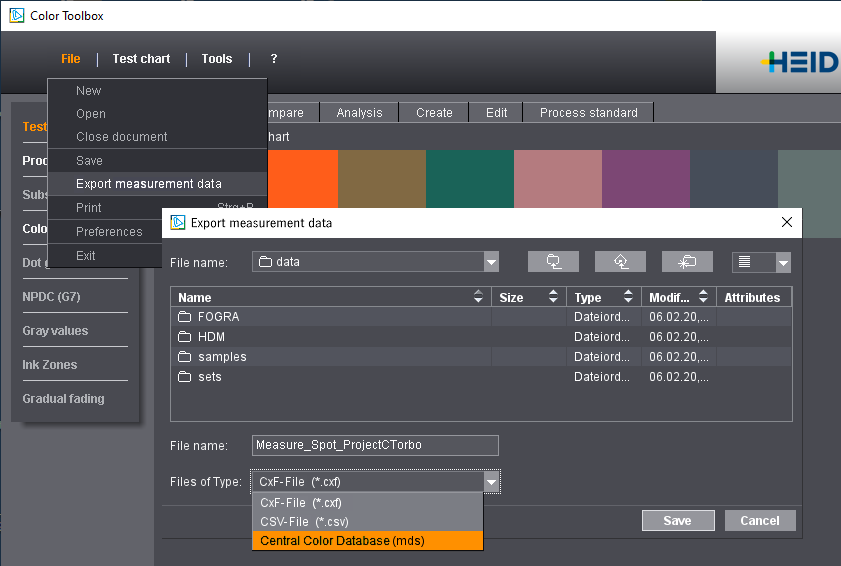
'Export measurement data' Dialog
You can call up this dialog with the "File > Export measurement data" menu in the "Measure" tab. You can save the data using the following file formats:
•CSV File: The CMYK and LAB values for each measurement patch are saved in a table as a csv file that you can then open with MS Excel, for example, and process them further.
•CxF file: CxF (Color Exchange Format) is a universal file format that makes sure you have an accurate and efficient exchange of digital standards, measurement data and metadata. As an open XML standard, the format makes a comprehensive understanding of color possible, even if the application and data to be communicated are still unknown.
When exporting to the CxF format, more information can be saved than when exporting to csv, e.g. spectral values. You can then use the CxF files to import the color data to color tables or the color master database or into systems of other vendors that are structured conform with the ISO 8859-1 standard.
You can also use this option if you are working offline when measuring spot colors or if you want to receive CxF measurement data from your customers and transfer these data to the color master database.
•Color Database: The measurement data are exported as new entries directly to the Central Color Database or the Color Library and are then available to all connected users. For example, you can use the Color Toolbox to measure spot colors and to store the measured values as a color in the color master data.
An entry with the name assigned during export is automatically created and displayed in the list. Missing measurement conditions or spectral values will be calculated automatically as needed.