
Privacy Policy | Imprint | Prinect Know How | Prinect Release Notes
Procedure instructions provide the user with important information about certain operations that display directly on the control panel of the press (Press Center). If necessary, a certain setup of the press (tape inserter must be brought near the press) can be demanded by a procedure instruction. These procedure instructions describe the specific and necessary steps that are assigned to an operation.
Examples for possible procedure instructions:
•Proof: The customer has ordered a proof for the job; the press operator must archive a sheet.
•Tape inserter: The user needs the instruction to enable the tape inserter, including the information about how many sheets before a tape will be inserted (e.g. after every 100 sheets).
•Next Day: Express production.
•Complaint: The job is reprinted in higher quality because of a customer complaint.
 Note: The instructions are assigned to operations by creating codes when you define instructions. A new column, "Procedure Instructions", was introduced to point out existing procedure instructions in the operation tables of the press and finishing steps. The codes for the procedure instructions display in this column. The complete procedure instructions display as a tool tip when you let the mouse hover over a table cell.
Create an Instruction Template
1.Click the "New Instruction" button. The parameters for definition of the instruction template display on the right of the window.

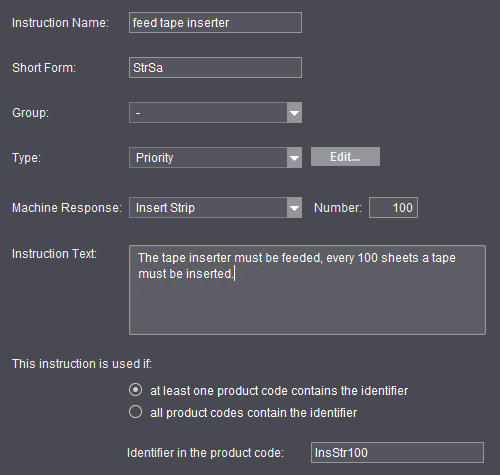
2.Type an informative name in "Instruction Name".
3.Give the instruction a code (Short Form). The code identifies the instruction template in Prinect Production. That is why the code for each instruction must be unique in the Prinect Production system environment. It may consist of a maximum of 5 characters (digits and special characters are permitted).
A code (Short Form) is mandatory for each instruction. An instruction cannot be saved without a code.
4.In the "Group" list box, you can select one of the available instruction groups and, by doing so, assign the instruction template to this group. See Groups.
5.In the "Type" list box, select the type of procedure instruction. By assigning them to a type, you can categorize procedure instructions and, by doing so, give users a note on what type of instruction it is. You can define new types with "Edit".
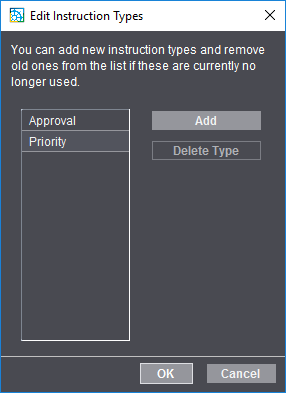
6.You can create a new instruction type with "Add". In the "Create new instruction" dialog, you can give the instruction type any name desired.
Privacy Policy | Imprint | Prinect Know How | Prinect Release Notes