
The resources in Signa Station have a certain interdependency. When a resource is refreshed, all resources containing the refreshed resource must be refreshed as well. When a color control bar is refreshed, you may have to also refresh the combination marks, the plate templates, the product part templates, and the job templates containing this mark. To facilitate this, you can run the "Resource Refresh Assistant".
Prerequisite: You can run the Resource Refresh Assistant only if no job is open.
To run the "Resource Refresh Assistant", choose "File > Resource Refresh Assistant".
The dependent resources are then checked for topicality in all resources (a progress bar appears during this process). The check applies only to those resources that would be refreshed automatically during a subsequent refresh (the schemes in product part templates, for example, are not considered). Resources that need to be reassigned for a refresh do not appear in the list either (such resources are, for example, platesetters that are referenced in the output parameter set).
This check can take some time, depending on the number of resources. Following the resource check, the Resource Refresh Assistant opens:
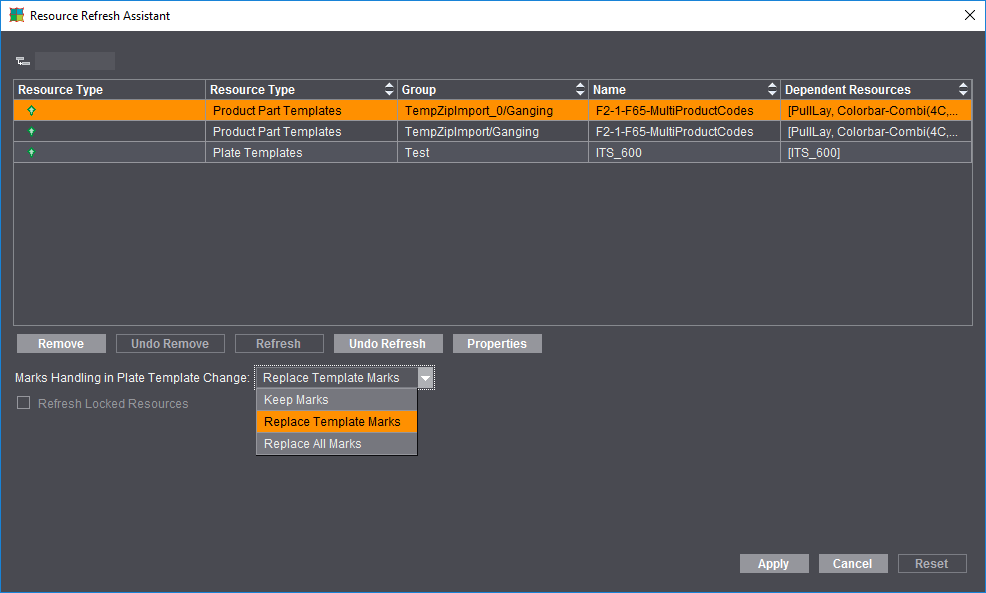
The table has five columns: Action, Resource Type, Name, Resource Group and Dependent Resources. In our example, some resources have a newer version in the resource pool. You can now define for each of the resources whether or not to refresh it. You can also tag resources to be deleted. A symbol indicates this action in the Action column:
•The green arrow indicates that the resource is to be refreshed
•The red cross indicates Resources that are to be deleted
•The padlock symbol indicates that the respective resource is locked
•Without any symbol in front of a resource means that the resource is excluded form refreshing by the Resource Refresh Assistant.
When a resource is selected, you can view its properties. The Properties dialog lists the selected resource and all dependent resources whose version is newer in the resource pool
The changes made in the Resource Refresh Assistant are written to the resource pool only when you click "Apply" (see Refreshing Resources). "Cancel" closes the Resource Refresh Assistant without making any changes. "Reset" returns the Resource Refresh Assistant to its original state (i.e. all resources to be refreshed are marked with the green arrow).
After the refresh, a results window displays showing tables with lists of the successfully refreshed resources and the deleted resources as well as of the resources whose refresh failed (ideally, the table "...not OK" should not have any items). After the results window closes, a second search starts because the refresh of some resources may require other resources to also be refreshed as a consequence (e.g. if a mark used in a plate template is refreshed which in turn is found in a product part template).
•Marks Handling in Plate Template Change
Marks handling can be defined with the list box when refreshing plate templates in job and product part templates. The default setting is "Replace Template Marks". Other settings you can select are "Keep Marks" and "Replace All Marks".
A warning is issued if a color control bar set manually beforehand and the color control bar of the new plate template overlap.
•"Refresh Locked Resources" Option
Locked resources are excluded from changes. The "Refresh Locked Resources" option must be enabled so that the "Resource Refresh Assistant" can refresh such resources as well.
You can export the resource pool before refreshing starts. This is feasible if you want to revert to the original version of the resources after refreshing.
When you click "Apply" in the Resource Refresh Assistant, the resources selected for refreshing will be refreshed, and the resources selected for deleting will be deleted.
A progress bar indicates the progress of the procedure.
Refresh of Schemes for Business Manager
Business Manager receives more details about the schemes as comments in the HTML description that is part of the resources. Older schemes must also be refreshed so that they contain these details. Because the Resource Refresh Assistant recognizes schemes that have outdated HTML text, you can use this Assistant to refresh older schemes at one go.