
Privacy Policy | Imprint | Prinect Know How | Prinect Release Notes
You can set up basic properties of Prinect Production and Cockpit in the "Preferences" section. These preferences let you define, for example, the dialog language that will be used when Cockpit launches, the units of measure that will be used, etc.
The "Preferences" section contains the following parameter groups:
The [username] placeholder is for the user that is logged in. This is where you define preferences that are applicable for a specific user.
•All users
This is where you define preferences that are applicable for all users.
This is where you must specify the paths to additional applications that work together interactively with Prinect Production. The accessibility of the files is checked and, if positive, indicated by an appropriate icon (green dot).
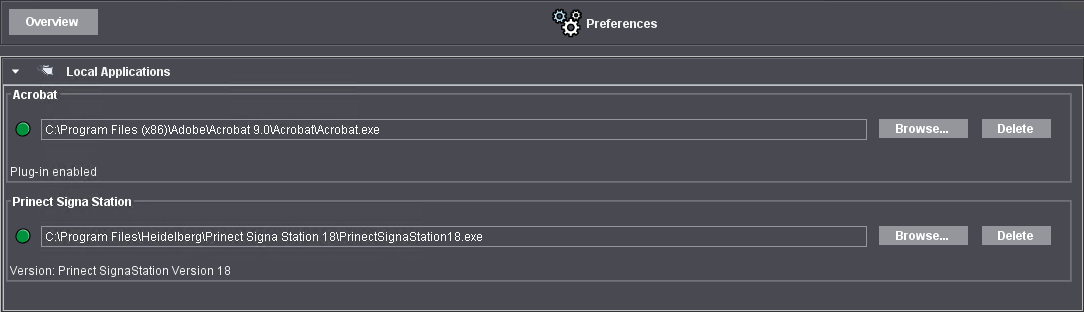
Set these local applications directly on the Cockpit computers on which the appropriate engines are installed. This can be a workstation computer or the Prinect server, depending on where the applications are installed. The applications are usually installed in the "Program Files" folder. You should disable the "Prinect Neighborhood" option if you use the "Browse" dialog.
•Acrobat
Enter the path to the "Acrobat.exe" file if it is not already set. Normally, this path is set because the system checks to see whether there is a version of Acrobat Professional during installation of the Prinect software. You can update the path details in this box if the Acrobat version was updated or installed in a different path.
•Prinect Signa Station
If one or more instances of the Prinect Signa Station or Prinect Signa Station Server software are installed on the Prinect Production Server, you must enter the path to the "PrinectSignaStationXX.exe" (XX = version number) or "HDPrinectSignaStationServer.exe" file. Only then is the interactive launch of Prinect Signa Station possible from Cockpit.
Parallel operation of multiple Prinect Signa Station Server-instances
Several instances (up to 4 in total) of the Prinect Signa Station or Prinect Signa Station Server software can be installed on the Prinect Production server and connected to Prinect Production. This means, for example, that several gang servers can be operated in parallel. Then there is a corresponding number of "Prinect Signa Station" entries and you have to specify the respective access paths.
 Prerequisite: To operate multiple Prinect Signa Station Server instances on the Prinect Production Server, the corresponding license options must be enabled. Operation of multiple instances must be configured in the Prinect Signa Station user interface. The Prinect Production Server computer must meet the following minimum RAM requirements:
•2nd Prinect Signa Station: 64 GB.
•3rd and 4th Prinect Signa Station: 128 GB.
Privacy Policy | Imprint | Prinect Know How | Prinect Release Notes