
Privacy Policy | Imprint | Prinect Know How | Prinect Release Notes
In the "Processing" section, you define the "process network" for processing the job, i.e. you put together the sequences required for processing the job in a graphical user interface, the "configuration area". By connecting the sequence symbols with connecting lines, you can cause the connected sequences to be executed automatically one after the other.
 Prerequisite: Before you add sequence templates or group sequence templates to a print job in the "Processing" section, you must first define or configure these sequence templates for the processing steps intended with this job. See Administration - Sequence Templates and Sequence Templates - Group Templates.
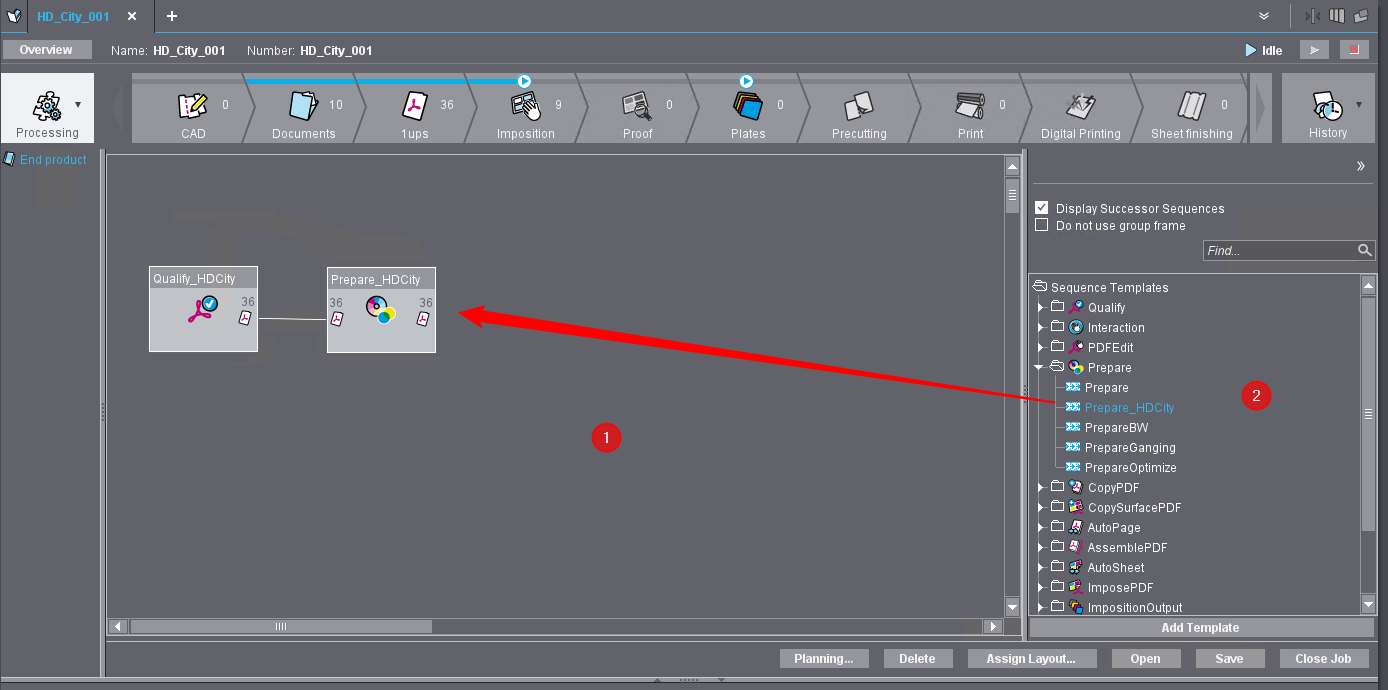
In this graphical user interface, select the processing sequence templates required for the job and add them to the print job.
If one or more predefined group sequence templates already exist that contain the appropriately configured sequence templates, you only need to select the appropriate group template(s) and add them to the job. This procedure is recommended for frequently recurring types of jobs that always require the same processing steps.
You add sequence templates to the job by selecting the relevant elements in the template area on the right-hand side of the window (2) and moving them to the configuration area (1).
All sequence and group templates that have already been defined are presented in the template area in the form of a tree structure. The structure initially shows the available sequence types and group sequences. Click on the small triangles in front of the folder symbols to open the associated substructure and display the individual sequence names.
Privacy Policy | Imprint | Prinect Know How | Prinect Release Notes