
Additional configuration options of the Data Terminal device with counter box
The only difference between creating a Data Terminal device with a counter box and configuring a Data Terminal device without a counter box is that the former requires an additional configuration step, "Counter box configuration". See Creating a Data Terminal device in the Cockpit device administration).
This additional configuration step is described below.
"Data Terminal with counter box" connection type
 Prerequisite: In the "General" configuration step, you have to select the "Data Terminal with counter box" item in the "Connection" list box.
"Counter box configuration" configuration step
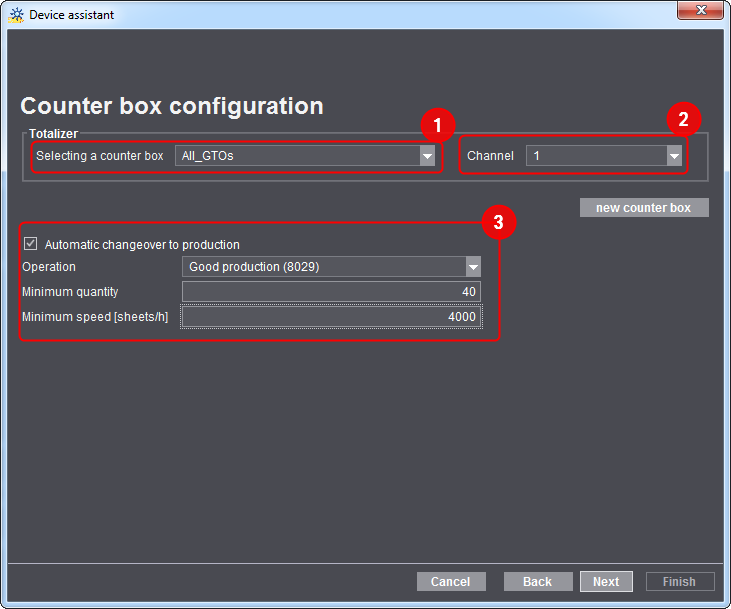
Here you define how the totalizer reading of the machine's counter box is transferred.
To configure the parameters of this configuration step, follow the steps below:
1.Select the counter box installed on the device in the "Selecting a counter box" list box (1).
You can choose from all the counter boxes that have been created in "Administration > Device configuration". See Create a New Counter Box. If the required counter box is not offered in the list box, you can create a new counter box using the "New counter box" button.
2.Assign a channel to the new machine (the new device) (2).
There are 6 channels for each counter box, i.e. one channel is available for each connected device.
3.Enable or disable the "Automatic changeover to production" option (3).
If you enable this option, the counter box will automatically switch to "Production" (good production) as soon as the parameterized conditions are met. In this case, "Production", i.e. the start of good production, does not have to be entered manually each time.
The "Operation" list box contains all operations assigned to the device. A suitable operation must be selected so that the "Automatic changeover to production" works.
The following two parameters must always be fulfilled at the same time:
•the minimum quantity must be reached, and
•the minimum speed must be maintained.
This parameterization ensures that the machine only switches to "Production" when, for example, a quantity of 10 sheets has been processed at a speed of 4000 sheets per hour. The machine does not change over to "Production" if one of the two parameters deviates from the default.
Privacy Policy | Imprint | Prinect Know How | Prinect Release Notes